Teach Claude a workflow by doing it once
Claude lets you build a Skill by recording yourself doing a task. You share your screen, talk through what you’re doing, and Claude turns it into a reusable Skill you can run again or put on a schedule. It’s in the Claude desktop app on Mac, for Pro, Max and Team plans.
Why it’s worth trying: the hard part of writing instructions for recurring work is everything you’d never think to write down, like the check you always run or the exception you handle without noticing. Showing the work gets more of that across than describing it. This also lets us see clearly where we spend most of the time and what doesn’t make sense to do anymore.
How to start a recording
There are two ways in:
Go to Customize → Skills → Add → Record your screen
Or click the + in the message box and choose Record a skill
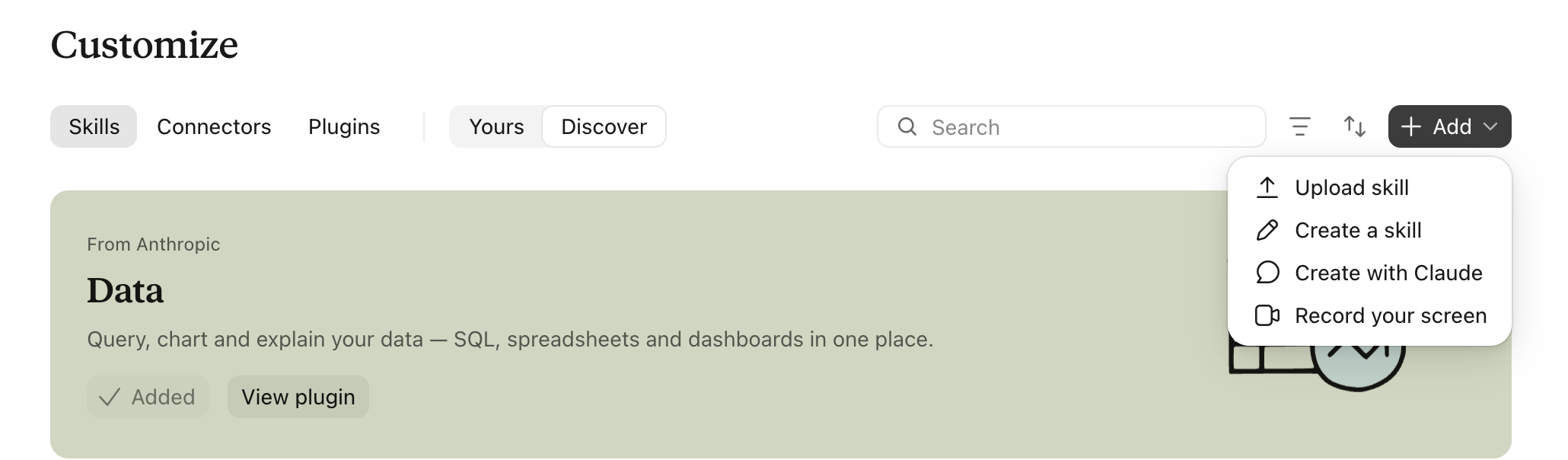
The first time, your Mac asks for screen and accessibility permissions. Grant them once. Then pick your microphone, click Start recording, do the task, and click Done when you’re finished.
How to get a Skill worth keeping
Pick one task. Something you do the same way every week, where the value sits in your judgment. Triaging your inbox, turning meeting notes into a decision summary, reviewing campaign copy against your brand rules, prepping a weekly update for your leadership team.
Narrate your reasoning while you work. “I skip these because they’re out of scope” teaches Claude more than just clicking. Say what you leave out, too.
Answer Claude’s follow-up questions. They point at the gaps in your narration, like where the output should land.
Read the Skill before you save it. Check whether Claude learned your rule or copied a detail from that one example. You can edit it any time later under Customize → Skills.
Test it on a fresh example before you schedule anything.
Keep passwords, confidential files and private conversations out of the recording. Demo on a dummy or anonymised case.
If you use ChatGPT, Gemini or Copilot, the same lesson applies when you write instructions there: explain the why behind each step, and say what to exclude.